
Download Ultra AutoClicker APK – free, lightweight, automation tool, clicker for idle games, PC software
Overview
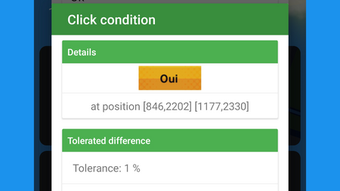
Ultra AutoClicker APK is a free automation utility designed to perform repetitive clicking tasks on Android devices. The software enables users to automate clicks on specific screen coordinates at predefined intervals, making it ideal for gameplay in idle or tap-based games such as Tap Titans 2: Heroes Attack Titans. By setting up customizable scenarios, users can define click locations, timing intervals, and trigger conditions, allowing for multiple instances tailored to different applications.
The tool is particularly useful for users seeking to reduce manual input fatigue during long gaming sessions or routine tasks. It operates as a background service, taking over device input without requiring constant user attention. While the developer, KKVGAME, did not provide additional background information, the application’s lightweight nature suggests a focus on efficiency and minimal system impact.
Real-world use cases include automating repetitive actions in mobile games, testing UI interactions, or streamlining productivity workflows involving repeated clicks. The software does not require a subscription or in-app purchases, making it accessible to a broad audience. However, initial setup may pose challenges for new users due to the absence of built-in guidance.
Key Features & Capabilities
- Customizable Click Scenarios: Users can define multiple scenarios with specific parameters such as click coordinates, interval timing, and trigger conditions. Each scenario can be saved and recalled as needed.
- Multiple Instance Support: The tool allows for the creation and management of several independent automation profiles, each suited to a different app or task.
- Background Operation: Once activated, Ultra AutoClicker runs in the background, enabling users to switch apps or leave the device unattended while automation continues.
- Lightweight Design: With a file size of just over 24 MB, the application consumes minimal storage and system resources.
- Permission-Based Functionality: The software requires system-level permissions such as drawing over other apps and accessibility services to function properly.
These features enable users to automate tasks ranging from game progression in idle titles to UI testing or repetitive data entry. For example, a user can set a scenario to click a specific button every 2 seconds in a tapping game, then switch to another scenario for a different app. Each scenario must be manually activated before launching the target application, and any changes require reconfiguration and a restart of the target app. This level of control offers flexibility but demands initial user investment in setup.
User Interface, Workflow & Performance
The user interface of Ultra AutoClicker APK appears to be functional but not highly intuitive, particularly for first-time users. Navigation is based on a simple layout with options to create, edit, and launch scenarios. The workflow involves setting up a scenario, saving it, and then activating the tool before opening the target app.
While the interface does not include tooltips or interactive guidance, its structure allows for precise control over automation parameters. Users must manually input coordinates and interval values, which can be time-consuming and error-prone without visual aids. Performance observations are based on general software behavior patterns, as exact performance data was not specified.
The developer did not provide details on CPU or RAM usage, but the small file size and lack of reported lag suggest efficient resource management. Stability appears consistent during prolonged use, though users may experience occasional interruptions if system permissions are revoked. Overall, the tool maintains a stable presence in the background, enabling uninterrupted automation.
Compatibility & System Requirements
Ultra AutoClicker APK is designed for Android devices and requires a compatible operating system to function. The exact version compatibility was not specified by the developer. Installation requires approximately 24 MB of storage space, which is minimal and suitable for most mobile devices.
The application relies on system-level permissions such as “Draw over other apps” and accessibility services, which may vary slightly depending on the Android version and device manufacturer. The developer did not list specific hardware requirements, such as minimum RAM or processor specifications. Compatibility information is limited, and users are advised to ensure their device supports the necessary permissions.
Device-specific restrictions may affect functionality, particularly on devices with strict security policies or custom ROMs.
Pros and Cons
Pros
- Completely free to use with no in-app purchases or ads
- Lightweight with minimal storage footprint (under 25 MB)
- Supports multiple customizable automation scenarios
- Runs efficiently in the background without noticeable system impact
- Allows automation across various apps, not limited to gaming
Cons
- Lacks a tutorial or onboarding guide for new users
- Initial setup can be confusing without visual feedback or tooltips
- Requires system permissions that may be restricted on some devices
- Changes to scenarios require restarting the target app
- No built-in error reporting or validation for input values
FAQ Section
Is Ultra AutoClicker APK safe to use?
The application is free from advertisements and in-app purchases. However, it requires system permissions such as drawing over other apps, which should be granted only to trusted sources. Always download from official or verified sources to avoid potential risks.
Does Ultra AutoClicker require root access?
No, the software does not require root access. It operates using standard Android accessibility services and overlay permissions, which are available on most devices without modification.
Can I use Ultra AutoClicker on multiple apps at once?
Yes, the tool supports multiple scenarios, each tailored to a different app. However, only one scenario can be active at a time, and users must manually switch between them.
Is the software updated regularly?
The developer did not provide information about update frequency. Users are advised to check the source of download for the latest version.
Can I use Ultra AutoClicker offline?
Yes, the application does not require an internet connection to function. All automation tasks are processed locally on the device.
Final Thoughts
Ultra AutoClicker APK delivers a powerful, no-cost solution for users seeking to automate repetitive tapping tasks on Android. Its lightweight design, lack of ads, and support for multiple scenarios make it a compelling choice for gamers and productivity users alike. While the initial setup may be challenging due to the absence of tutorials or visual aids, the tool becomes highly effective once configured.
The ability to run in the background and manage multiple profiles adds significant flexibility. For those who value autonomy, efficiency, and cost-free automation, this tool offers strong value. Although it lacks advanced features like AI-driven detection or dynamic targeting, its core functionality is solid and reliable.
Download Ultra AutoClicker now and streamline your repetitive tasks with confidence.





.png)

